Revision: a local-first FSRS-5 desktop app with drag and air gestures
Revision is a local-first desktop app for principal-level interview prep across DSA, system design concepts and use cases, AI concepts and use cases, and behavioral topics, with FSRS-5 scheduling, a keyboard-first review loop, and grading by drag or air gesture.
Source: github.com/xpressabhi/revision · Releases: v0.5.0 (macOS .dmg + Windows .exe/.msi, each under 25 MB) · Stack: Tauri 2 + React 19 + TypeScript + Vite 7 + KaTeX, SQLite revision.db with a localStorage fallback for the browser preview. No cloud, no account.
Update: v0.5.0 visual overhaul
This post was written against v0.4.0 and the screenshots above are now from v0.5.0 (all five refreshed). Two things changed, neither touches the interaction model:
- Design overhaul across the app. One brand accent per theme (the second-accent drift is gone), a unified shape scale (cards 12px, overlays 16px, inputs 8px, pills), and a Geist/Satoshi-first type stack with Inter dropped as the default. Stronger
prefers-reduced-motionhandling and a solid-accent focus ring. Review keeps the same gestures and grading, with calmer hints and readout copy. - Copy cleanup. No em/en dashes in UI strings and middle-dot separators capped at one per line, the same rules I apply to my portfolio. Empty states and tooltips are clearer.
- Retention forecast stays in bounds (fixed). The chart floor is now derived from the actual data minimum (snapped to 5%) instead of a hard 0.75, so decaying forecasts no longer draw past the axis. Grid ticks and the day axis follow the same scale.
What it is
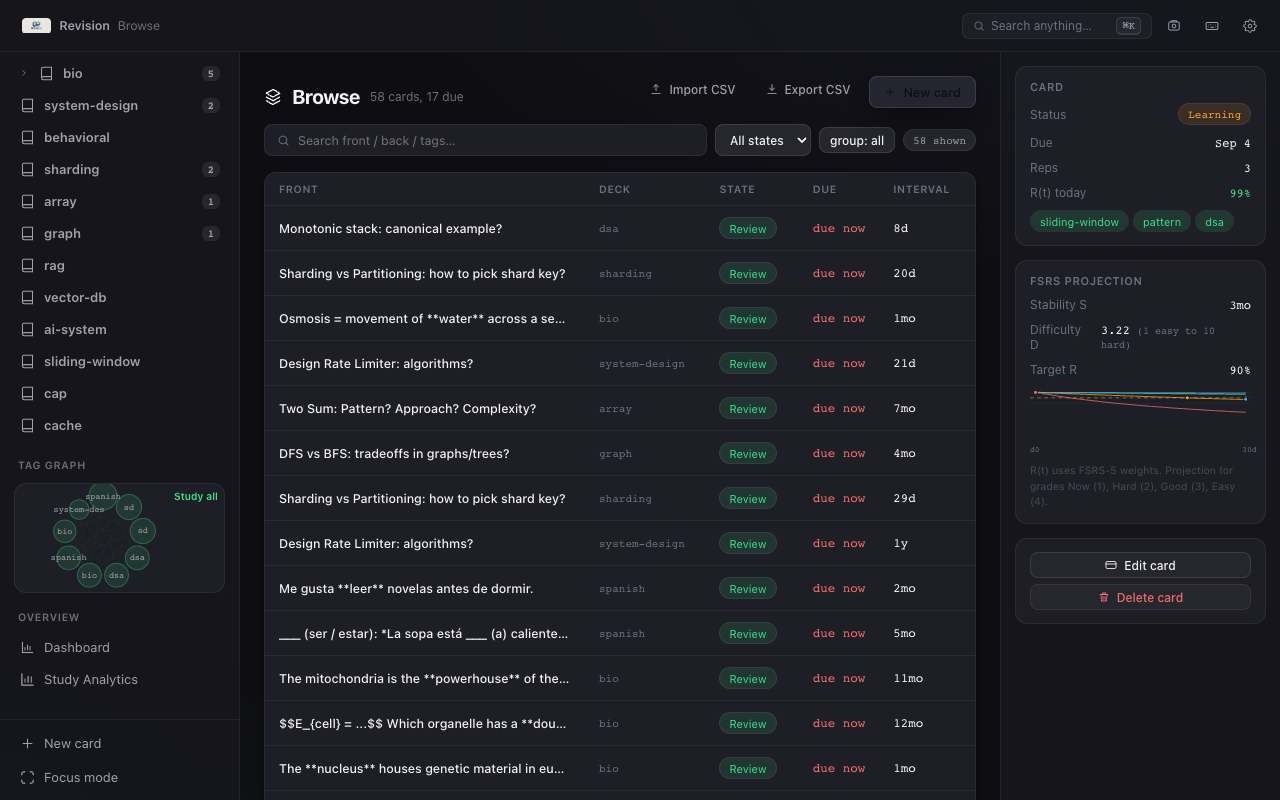
One SQLite file (revision.db via tauri-plugin-sql, or localStorage keys like revision_cards in the browser) — everything else is derived. A single Revision deck with tag trees (dsa, sd-concepts, sd-use-cases, ai-concepts, ai-use-cases, behavioral, bookmark …) replaces the usual multi-deck model. The shell is a 3-pane glass layout — collapsible sidebar (decks, smart filters, tag graph), central canvas, inspector — with four themes, command bar (⌘K), quick capture (⌘⇧K), cloze deletions and KaTeX, a 53-week heatmap and retention forecasts.
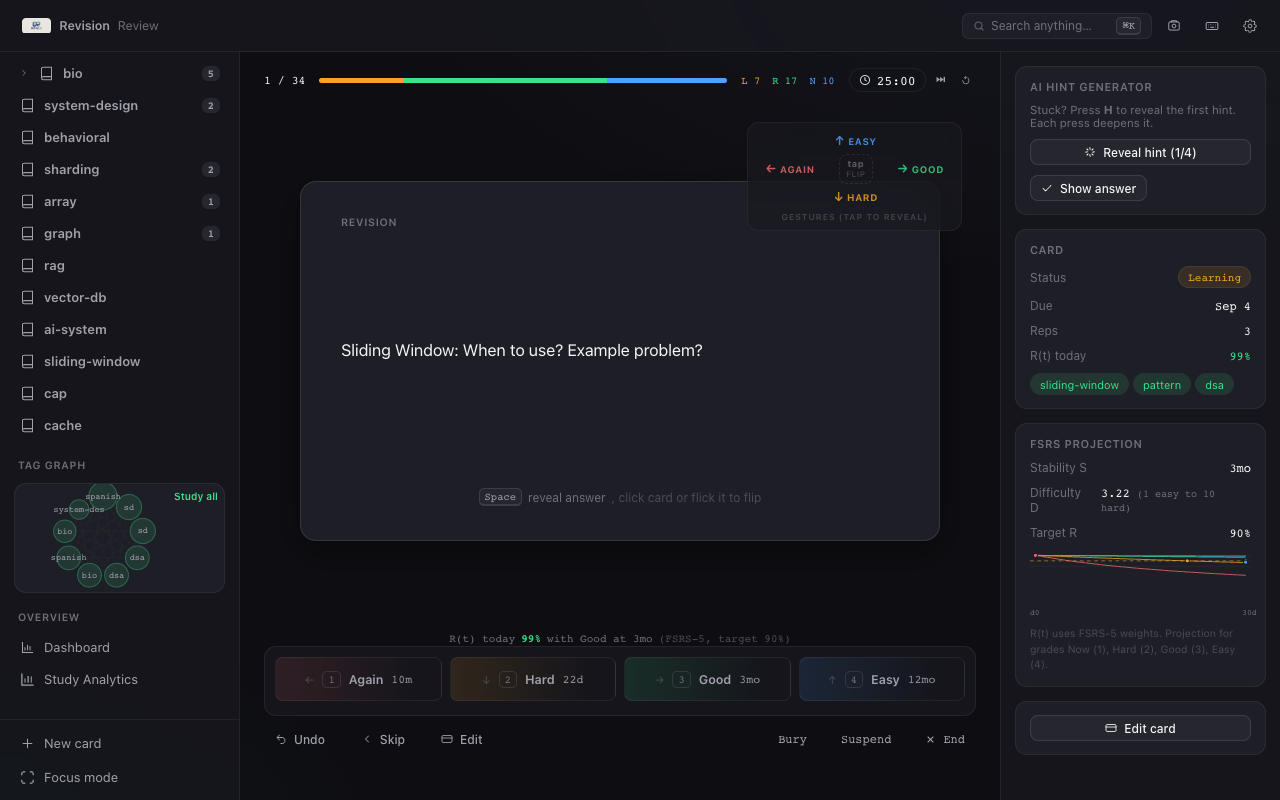
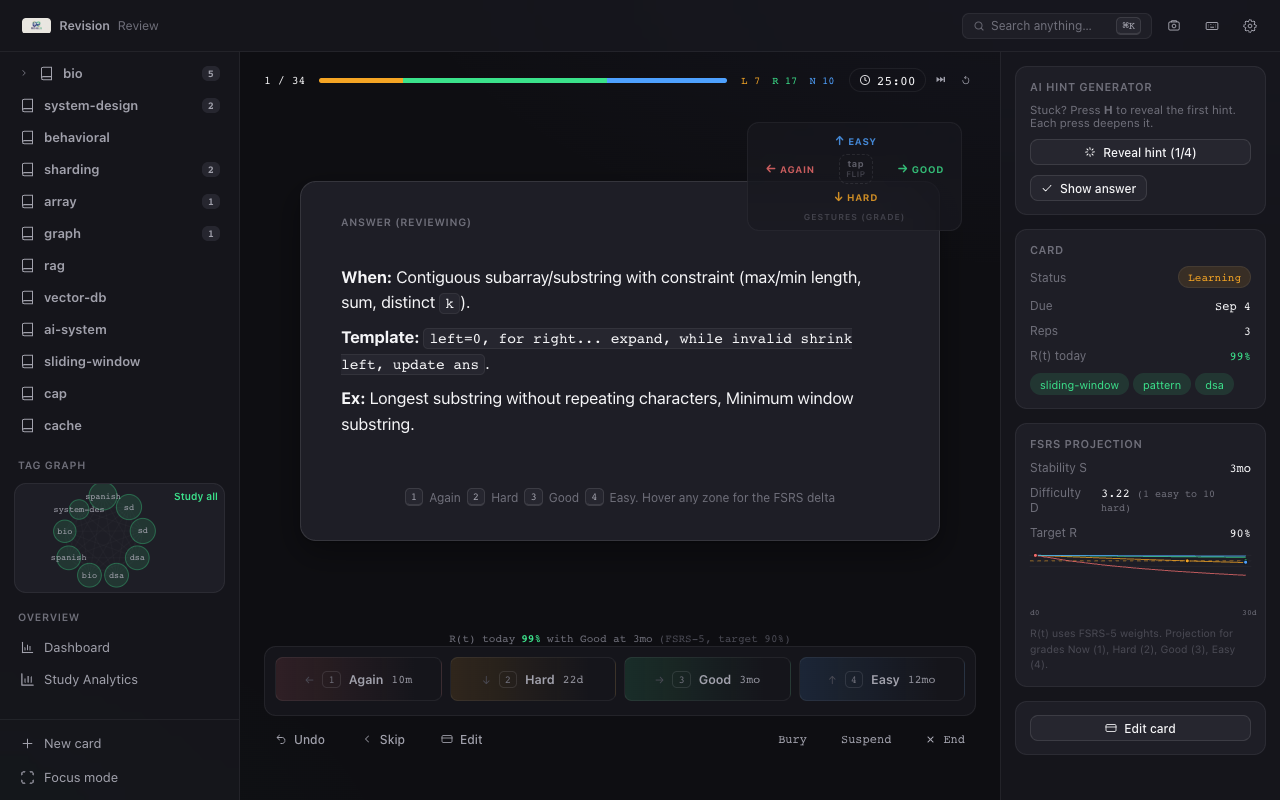
The review queue is opinionated: learning (10 m step) → due → new (new cards capped at 20 per session), scoped by tag group or ⌘K smart filters. Hidden card → flip (Space / Enter / click / flick); shown card → grade 1–4 (or a gesture) with live FSRS intervals on the grading bar.
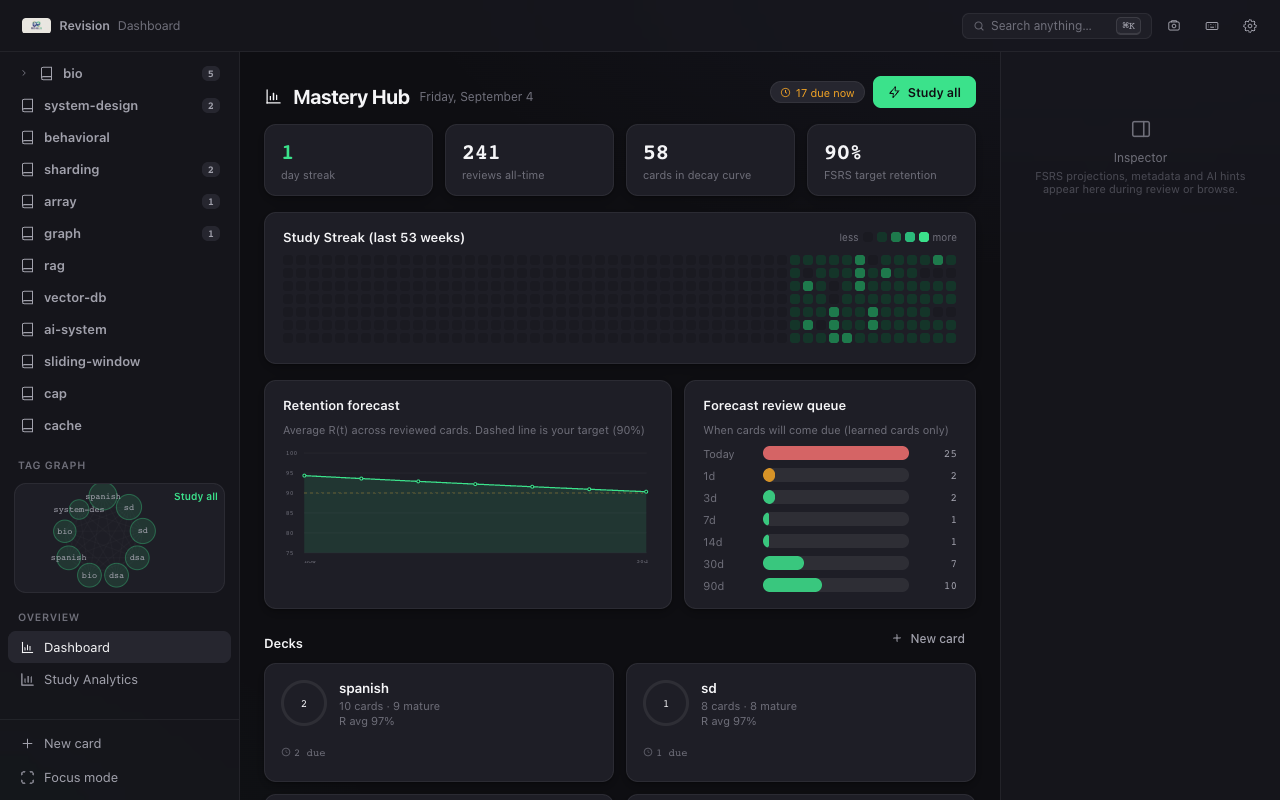
Sidebar (tag tree)        Canvas (Dashboard / Review / Browse / Analytics)      Inspector (FSRS + hints)
─────────────             ──────────────────────────────────────────            ───────────────
Due · New · Learning      Review: flip-wrap → grade bar → session stats         Retrievability, interval
                          Browse: search + filters + inline edit                predictions per grade
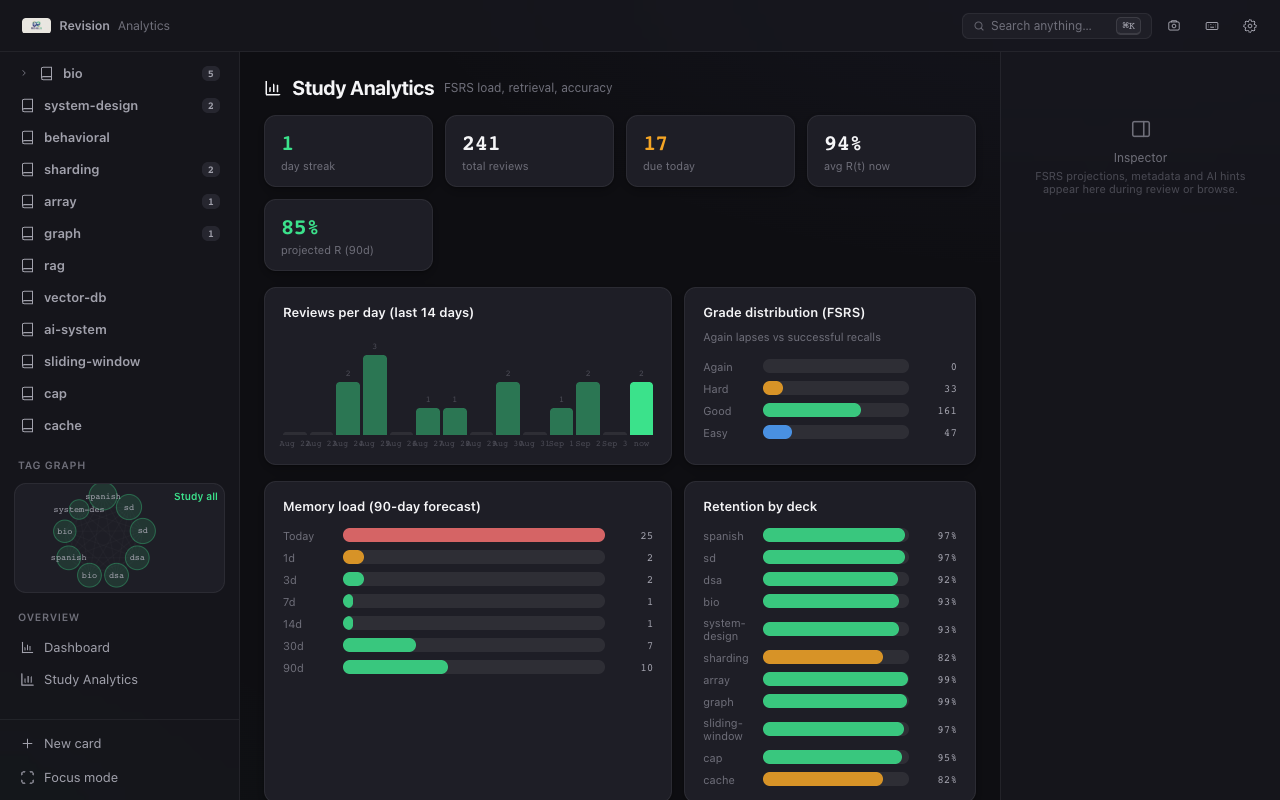
                          Analytics: streak heatmap · forecast                  cloze/hint controls
Decision 1: FSRS-5 you can see
Anki's SM-2 works until it doesn't — stability collapses silently, difficulty never moves, and intervals feel arbitrary. Revision uses an FSRS-5-inspired scheduler (src/lib/fsrs.ts) — the same family of models behind modern Anki — offline, deterministic, per-card.
- Weights: 19 published FSRS-5 defaults (
Winsrc/lib/fsrs.ts:16), operating on per-cardstability/difficulty/retrievability. No server, no training job — the math runs oncard_state.stabilityandcard_state.difficulty. - Retrievability:
R(t) = (1 + 19/81 · t/S)^-0.5(src/lib/fsrs.ts:31) andintervalDays(S, 0.9)— days untilR(t)decays to the desired retention — drive every prediction. - Live predictions:
predictIntervals(state, desiredRetention)(src/lib/fsrs.ts:137) recomputes all four grades on every card, rendered on the grading bar before you commit. Hovering a zone shows the delta — "Good → 6d · R at due 89%". - Desired retention 80–95% (
SettingsView) — slide it and the intervals move. Again restarts at the 10-minute learning step (src/lib/fsrs.ts:22); Good/Hard/Easy project long-term intervals scaled by1.3×for Easy. - Inspector honesty: current
R(t)today (cardRetrievability,src/lib/fsrs.ts:169), per-grade curves, and the forest-vs-tree view in Analytics so you can see whether you're carrying too much new material.
The product point is transparency. You never grade blind — the bar tells you what each button costs before you press it.
Decision 2: drag as the grading language
Keyboard-first was non-negotiable (Space reveal, 1–4 grade, G cloze, H hints, ⇧G undo, ⌃→ skip, ⌘K palette — src/App.tsx:222), but grading 1–4 on a laptop all day is finger gymnastics. The grading gesture makes the card itself the control.
useDragGesture (src/lib/gestures.ts:31) is a pointer-drag layer on .flip-wrap in ReviewView.tsx:58:
| Constant | Value | Why |
|---|---|---|
| Deadzone | 6 px | ignore micro-jitter |
| Tap | <10 px & <260 ms | flip on click/tap |
| Flip threshold | 64 px | short flick before reveal |
| Grade threshold | 118 px | deliberate commit once shown |
| Max dist | 260 px | clamp so the card never leaves the stage |
| Fly-out | 230 ms (170 ms for flip) | tilt → fly, then callback |
- Hidden card: a short flick in any direction flips to reveal; a tap flips back.
- Shown card: grab and the card follows the pointer with a
rotate(x * 0.045deg)tilt (src/lib/gestures.ts:161), directional badges light live (swipe-badge litinReviewView.tsx:283), release past the glow to fly out and grade, release short to spring back with no effect. Links and buttons inside the card are excluded via[data-no-gesture]anda/buttonguard (src/lib/gestures.ts:73); touch vertical swipes scroll instead of grading. - Gesture map: the compact d-pad at the top-right of the card (
GesturePad,ReviewView.tsx:250) is both legend and control — center = tap/pinch to flip, arrows = grade. Clicking an arrow grades directly, which saved a lot of onboarding.
The mapping is fixed and always visible:
| Direction | Grade | Key | Meaning |
|---|---|---|---|
| ← left | Again (1) | reset | 10 m step, stability collapses |
| → right | Good (3) | normal | FSRS interval |
| ↑ up | Easy (4) | bonus | 1.3× interval |
| ↓ down | Hard (2) | penalty | shorter growth |
Hover highlights on the map, plus g-swipe arrows on each grade zone (ReviewView.tsx:218), keep the mapping in peripheral vision — you learn it in about three cards.
Decision 3: air gestures, fully on-device
Drag proved the interaction; the camera proves it can leave the pointer behind. Air gestures are opt-in (Settings → Gestures, recall_air_gestures in localStorage — src/App.tsx:194) and run entirely locally — no upload, no API key.
- MediaPipe HandLandmarker, WASM +
hand_landmarker.task(~7.8 MB) committed underpublic/mediapipe/(AGENTS.md:43) so the app works offline after install. The@mediapipe/tasks-visionbundle is dynamic-imported only when camera mode turns on — cold start pays nothing. HandOverlay.tsx—getUserMedia+ detect loop with PiP preview, landmark skeleton, and a status chip (tracking/camera denied/no camera/timeout). The timeout watchdog (10 s) handles headless/CI wheregetUserMediahangs — the overlay says so and the app degrades to keyboard/drag.HandGestureDetectorinsrc/lib/handGestures.ts:24— a synthetic-testable classifier over normalized landmarks:
- Pinch = flip — thumb tip 4 vs index tip 8 distance under 0.055, while middle/ring/pinky stay over 0.11 away from the thumb; edge-triggered with a 600 ms cooldown (
src/lib/handGestures.ts:62). - Swipe = grade — palm centroid history over a 110 ms window, axis-locked, requires 0.085 initial move and 0.3 total travel on the dominant axis before firing, with a 900 ms cooldown and a 0.1 reset distance to prevent chatter (
src/lib/handGestures.ts:17-20). Same← Again · → Good · ↑ Easy · ↓ Hardmap as drag.
macOS camera permission is wired at the bundle level (src-tauri/Info.plist + Entitlements.plist, referenced in tauri.conf.json: bundle.macOS.entitlements — src/AGENTS.md:37). A noisy classifier is worse than no classifier — the cooldowns and reset-distance logic eliminated the false-grade burst that plagued early builds.
Decision 4: activity-aware sessions (v0.4.0)
Spaced repetition only works if every recorded grade is real recall. Leaving a card answer exposed while you answer Slack breaks that.
src/lib/session.ts and src/App.tsx:478 add a small state machine around the review loop:
reviewing  ──(idle ≥ staleMin)──► stale: hide answer, pause pomo, show banner
   ▲                                    │
   └── any key/click/swipe ─── Resume ──┘
   └────── Restart queue ── re-derive queue from current DB
   └────── End ── back to dashboard
└────── auto-end after 15 m idle (toggleable)- Threshold:
StaleThreshold = 0 | 1 | 3 | 5 | 10minutes (src/lib/session.ts:1), default 3 m —Offdisables it. Sweep runs every 5 s (SWEEP_MS,src/lib/session.ts:5). - Window-aware:
visibilitychange+blur/focusinsrc/App.tsx:543— return after≥ staleMinfrom another app triggers the same treatment instantly, so the exposed answer never counts as recall. - Resume is a no-op grade —
touch()on any activity (src/App.tsx:482) resetslastTouchRef,resume()clearsstalewithout grading the hidden card. The banner copy is explicit: "your queue and progress are untouched until you resume."
Fifteen minutes auto-ends the session (AUTO_END_DEFAULT_MIN, src/lib/session.ts:4) because the queue should be re-derived anyway. Burying and suspending still work per card (B/S — src/App.tsx:455), independent of staleness.
Decision 5: shipping small
The app could have been Electron + cloud sync + a design-system landing page. The constraint was the opposite: one file, no account, works on a fresh Mac with no network.
- Tauri 2 + SQLite (
src/lib/db.ts:29lazy-importstauri-plugin-sql,Database.loadofsqlite:revision.db; browser fallback insrc/lib/db.browser.tskept in sync on schema changes). Migrations are explicit — single Revision deck (src/lib/db.ts:54), FSRS columnsstability/difficultyadded viaALTER TABLEwhen missing (src/lib/db.ts:127), legacyintervalbackfilled tostability(src/lib/db.ts:164). - Single-deck + tags (
src/lib/derive.ts: buildTagTree,src/lib/db.ts:38deckNameToTag) — CSV import maps old decks to tags so old data migrates without a prompt (src/lib/db.ts:434).
- Release pipeline: GitHub Actions
.github/workflows/release.ymlbuilds a matrix (macOS arm64 + x64 + Windows) on everyv*tag. Version lives in three manifests —package.json,src-tauri/tauri.conf.json,src-tauri/Cargo.toml(AGENTS.md:21) — and README links + asset sizes are hardcoded per version (AGENTS.md:30). All installers stay ≤ 25 MB (README.md:22). - Tray, widget, launch-at-login:
Due X • New Ytray menu (App.tsx:123invokeofupdate_tray), in-app 340×190 widget window plus a WidgetKit Desktop widget (src-tauri/RevisionWidget/,scripts/build-widget.sh),tauri-plugin-autostartbehind a Settings toggle.
The boring truth: the commit discipline (feat:/fix:) and the "no comments unless asked" repo rule matter more for ship cadence than any framework choice.
What I kept out
- Cloud sync — one SQLite file is the backup story (
Export CSV+revision.dblocation indocs/USER_GUIDE.md:75). Sync is a distributed-systems product, not a feature flag. - A second deck table — tags compose better for cross-cutting filters (stuck cards under 80%
R, due-today across all tracks). - An LLM evaluator for answers — FSRS already measures recall over time; judging "was that a good explanation?" belongs in the inspector hints, not the grade.
- Fancier hand tracking — one hand, one detector instance. Multi-hand added nothing except CPU.
Honesty as a feature (borrowed from SpendIQ)
The system prompt problem shows up here too: an agent that grades itself should not invent its own difficulty curve. Every interval is derived from predictIntervals before you press, retrievability is shown at due time, and analytics split new/learning/review so you can see when you're flooding the future. The user guide documents step-away handling, the development doc documents the three-manifest release rule, and the changelog is the source of truth for what shipped when.
Stack & links
Python wasn't needed here — just web and Rust glue:
Stack: Tauri 2 · React 19 · TypeScript 5.8 (strict) · Vite 7 · KaTeX · MediaPipe Tasks Vision · tauri-plugin-sql · tauri-plugin-autostart · Swift + XcodeGen (WidgetKit)
Browse the code at github.com/xpressabhi/revision, grab the latest release, or run the browser preview with npm run dev at http://localhost:1420 — it uses localStorage so you can try everything without installing the app. If you're hiring for frontend architecture, app shell design, or local-first tooling, my email is in the profile.