Switchyard: Watch What Happens Inside an Agentic AI + RAG Pipeline
▶ Open Switchyard
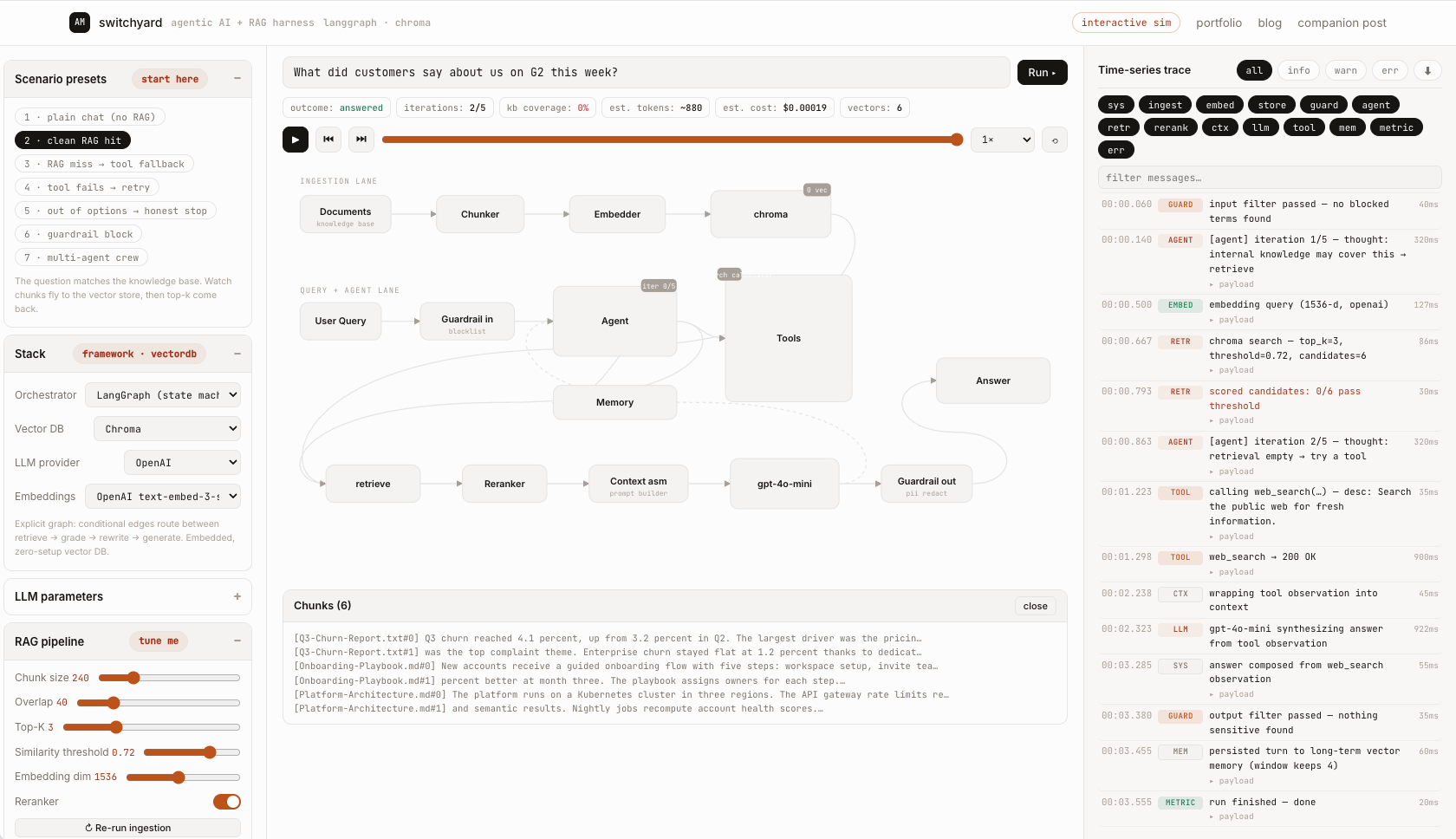
Most RAG tutorials show you the happy path and stop there. But the real learning, the part that makes you useful when a pipeline misbehaves in production, is in what happens around the LLM call: chunking decisions, similarity scores falling below a threshold, an agent burning iterations, a tool timing out and getting retried. So I built Switchyard — an interactive harness where you configure every one of those knobs and watch the consequences animate in real time, with a time-series log of every internal step. Like a rail yard for AI workflows: you see every car get switched onto its track.
🧭 What It Is
A single self-contained HTML page — no install, no API keys, no data leaves your browser:
- Configure everything: orchestrator framework, vector database, LLM/embedding providers, chunking, retrieval thresholds, agent loop pattern, guardrails, tools, and the knowledge base itself.
- Watch data flow: an animated pipeline where packets travel between components as each step executes.
- Read the trace: a timestamped log of every internal event — embeddings, ANN searches, reranking, tool calls, retries, guardrail verdicts — with expandable payloads and per-step latency.
- Export your work: download the config as JSON, share it in a URL, or generate a starter code scaffold for your chosen framework.
🗺️ The Pipeline At A Glance
Switchyard draws two lanes, because agentic RAG really has two distinct flows:
INGESTION (runs whenever the KB changes)
  Documents ──▶ Chunker ──▶ Embedder ──▶ Vector Store

QUERY + AGENT LOOP (runs per question)
  Query ──▶ Input Guardrail ──▶ Agent ◀──▶ Tools
                                 │    ▲──── Memory
                                 ▼    │ (loop back)
                             Retriever ──▶ Vector Store ──▶ Reranker

  Retriever ──▶ Context Assembly ──▶ LLM ──▶ Output Guardrail ──▶ Answer
Every box is clickable during or after a run — the inspector shows you the actual chunks stored, the similarity scores, the assembled prompt, or the memory contents.
🎛️ Everything Is Configurable
The stack selector
Pick an orchestrator and vector DB and the whole simulation speaks their vocabulary — node names, log lines, even the exported code scaffold change:
| Orchestrator | Flavor |
|---|---|
| LangChain | chains: retriever → stuff_documents → LLMChain |
| LangGraph | state machine: retrieve → grade_documents → rewrite_question → generate, with conditional edges |
| LlamaIndex | query engine over an index, response synthesizer |
| Haystack | declarative pipeline components |
| CrewAI | role-playing crew: Researcher → Writer → QA Reviewer |
| AutoGen | conversable agents in group chat |
Vector DBs from in-memory numpy (best for learning) through Chroma, FAISS, Qdrant, Pinecone, Weaviate, pgvector, and Milvus — the log shows the actual call shape each one uses (collection.query(n_results=k), ORDER BY embedding <=> $1 LIMIT k, …).
The knobs that actually matter
These aren't decorative sliders — they change outcomes deterministically:
- Chunk size / overlap → watch chunk boundaries recompute live on ingestion.
- Top-K / similarity threshold → raise the threshold until nothing passes, then watch the agent's fallback strategy kick in.
- Reranker toggle → see candidate order change before context assembly.
- Agent pattern → ReAct, Plan-and-Execute, or an explicit state graph (which adds a
rewrite_questionretry on empty retrieval). - Max iterations + fallback policy → fall back to a tool, answer best-effort, or refuse.
- Guardrails → blocklist terms stop requests before any tokens are spent; output filter redacts sensitive patterns.
- Tools → enable/disable, edit descriptions, set latency and failure rates.
- Chaos controls → slow any component 4× or fail the next tool call on purpose.
🎬 Seven Scenarios Worth Running
Presets load a config + query so you can see each failure mode honestly handled:
- Plain chat — no retrieval needed; the agent answers directly.
- Clean RAG hit — chunks fly into the store, top-k comes back above threshold, answer cites sources.
- RAG miss → tool fallback — every candidate scores below threshold; the agent pivots to web search.
- Tool fails → retry — injected failure, backoff, successful retry, answer still lands.
- Out of options → honest stop — tools disabled plus an unreachable threshold: retrieval misses, no tool fits, and the agent stops with a visible stop reason instead of guessing.
- Guardrail block — a blocked term gets caught at the door; zero LLM spend.
- Multi-agent crew — Planner decomposes, Researcher gathers, Critic reviews with a revision round.
My favorite exercise: run scenario 2, then drag the similarity threshold up a few notches and re-run the same query. Watching the exact moment the answer path changes teaches more than three blog posts.
📜 Reading the Time-Series Log
The right panel streams every event with millisecond timestamps, component tags, severity, latency, and expandable payloads:
00:00.060  SYS     run start — query received: "Why did churn increase last quarter?"
00:00.105  GUARD   input filter passed — no blocked terms found
00:00.370  AGENT   [agent] iteration 1/5 — thought: internal knowledge may cover this → retrieve
00:00.512  EMBED   embedding query (1536-d, openai)
00:00.640  RETR    chroma search — top_k=3, threshold=0.72, candidates=9
00:00.700  RETR    scored candidates: 3/9 pass threshold
                   ▸ payload  Q3-Churn-Report.txt#0 → 0.847 ✓
                              Onboarding-Playbook.md#2 → 0.511 ✗ below-threshold
00:00.910  RERANK  cross-encoder rerank reordered 3 chunks
00:01.010  CTX     assembling prompt: system(112 ch) + memory(0 turns) + 3 chunks
00:01.080  LLM     gpt-4o-mini — prompt ready (~380 tok est.), temp=0.3
00:01.900  GUARD   output filter passed — nothing sensitive found
00:02.000  METRIC  run finished — done
Filter by component or level, search messages, pin auto-scroll, and export the whole trace as text — handy for comparing two configurations side by side.
The metrics strip summarizes each run: outcome, iterations used, knowledge-base coverage, estimated tokens, estimated cost (local models correctly cost $0), and total vectors indexed.
📤 Make Your Configuration Reusable
Three exports, all from the footer chips:
- ⬇ export config — the full setup as JSON (copy or download).
- 🔗 share link — encodes the entire config in the URL hash; send it to a colleague and they land on your exact setup.
- ⌨ code scaffold — generates a starter script for your selected orchestrator × vector DB combination with your chunk sizes, top-k, temperature, and model names already filled in. It's a scaffold, not magic — adapt credentials and prompts before running.
And the mirror image: ⬆ import config accepts pasted JSON or a file, so a teammate's shared link or downloaded config drops straight into your session.
💡 What Simulating Teaches That Docs Don't
- Retrieval quality is a threshold negotiation. Top-K and similarity thresholds trade recall against noise, and the "right" values move per query — watching scores land makes that visceral.
- Agents are loop policies, not magic. Thought → action → observation, bounded by max iterations and a fallback rule. Every agent bug is visible as a bad decision inside that loop.
- Failure handling is the product. Retry-with-backoff, refuse-rather-than-hallucinate, and guardrail short-circuits are what separate a demo from a system.
- Cost lives outside the answer. Embedding calls, re-ranking, and burned iterations all spend tokens before a single word streams out.
Built as a single dependency-free HTML file — view source, fork it, break it. Switchyard lives at sims/agentic-rag.html.